- Ralph Danding
- Category - Medical Practices

 Skip to content
Running a medical practice can feel like a constant juggle. If things seem chaotic, it might not be about having enough staff; it’s often about how the work gets done. This guide explores Clinical Workflow Optimization to help your practice run more smoothly, improving how tasks flow from start to finish.
We’ll cover why this matters now, the risks of leaving inefficiencies unaddressed, and practical ways to make improvements, including how new tools can help. It’s all about working smarter, not harder, for better patient care and less stress.
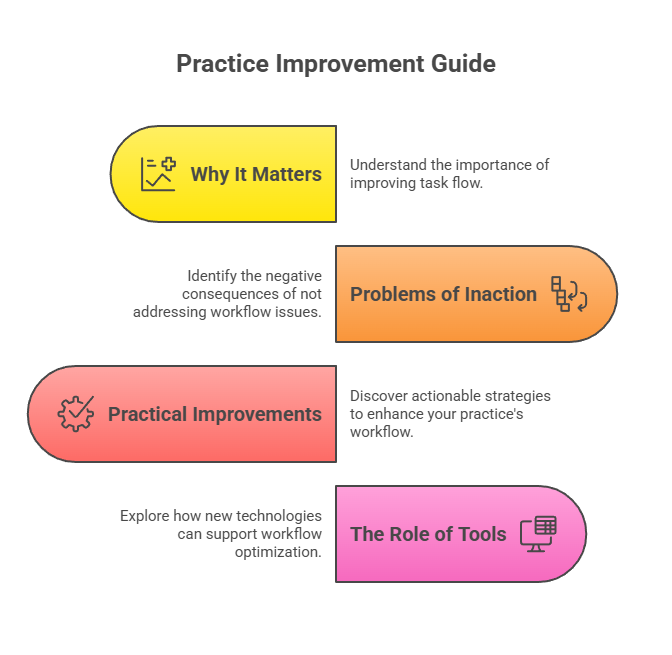
Clinical workflow optimization is basically about making the day-to-day operations in your medical practice run smoother. Think of it as fine-tuning the engine of your practice so everything works together better. It involves looking at how tasks are done, from when a patient calls to book an appointment all the way through their visit, treatment, and follow-up. The goal is to find ways to do these things more efficiently, with fewer hiccups, and ultimately, to provide better care.
Why is this so important right now? Well, healthcare is changing fast. Patients expect more, regulations are always shifting, and practices are feeling the pressure to do more with less. Ignoring how your practice operates can lead to wasted time, frustrated staff, and even mistakes that affect patient well-being. It’s not just about being busy; it’s about being effective.
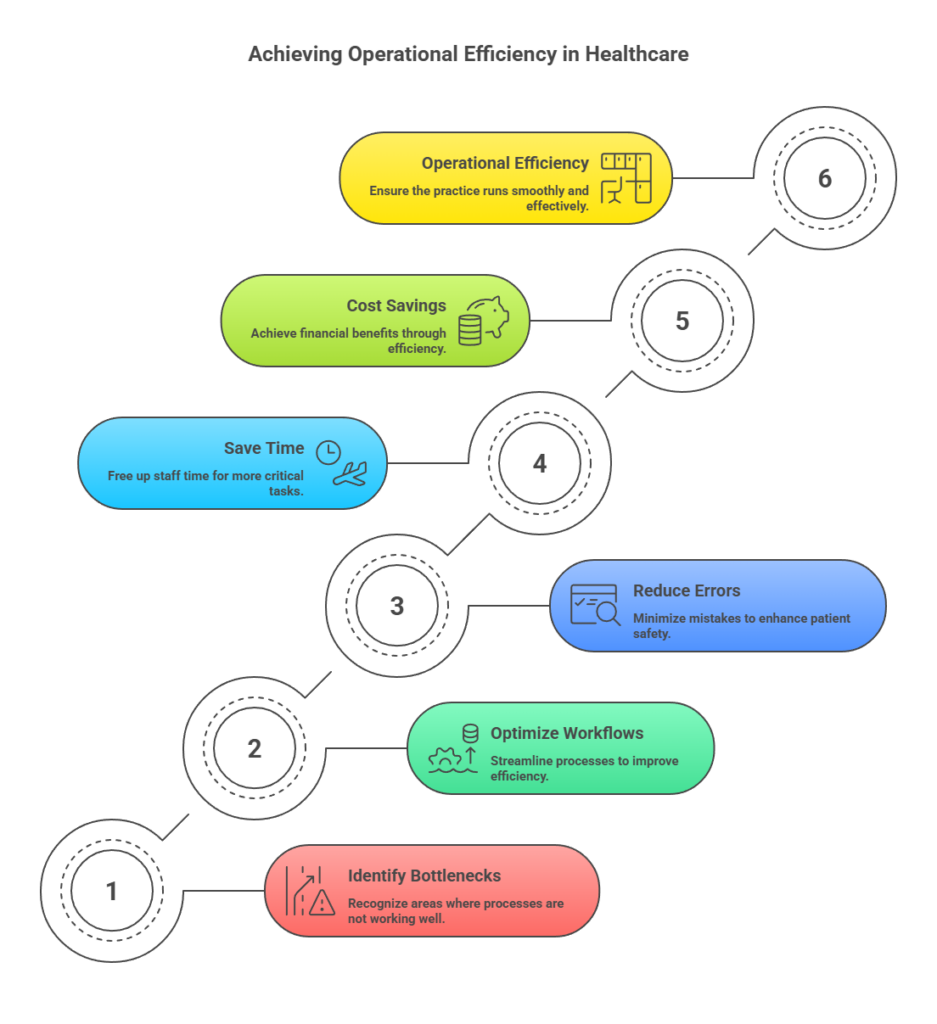
Each of these steps, and many more in between, represents an opportunity for improvement. When these processes aren’t working well, it creates bottlenecks. This can mean longer wait times for patients, increased stress for your team, and a higher chance of errors. Optimizing these workflows can lead to significant improvements, like saving time for healthcare staff and reducing errors and delays, which in turn improves operational efficiency and can lead to considerable cost savings.
It’s about making sure your practice is set up for success in today’s demanding healthcare environment. Getting your appointment setting right, for instance, can make a big difference in how smoothly your practice runs from the very first contact. Appointment setting training can help ensure your front desk staff are equipped to handle calls efficiently and effectively.
The reality is, many practices operate on systems that have evolved organically over time, rather than through deliberate design. This often means inefficiencies have crept in unnoticed, impacting both staff morale and patient satisfaction. A well-organized approach to workflow improvement resolves inefficiencies, ensuring predictable, positive outcomes for everyone.
It might seem like a lot of work to change how things are done in your practice, but not doing anything can actually cost you more in the long run. When workflows are clunky or inefficient, it doesn’t just make your staff frustrated; it directly impacts your patients and your bottom line.
Think about the small delays that add up. A patient waiting too long for a prescription refill, a doctor spending extra time searching for a patient’s chart, or staff members duplicating tasks. These aren’t just minor annoyances; they represent lost time and resources. These inefficiencies can lead to decreased patient satisfaction, higher staff turnover, and ultimately, reduced revenue.
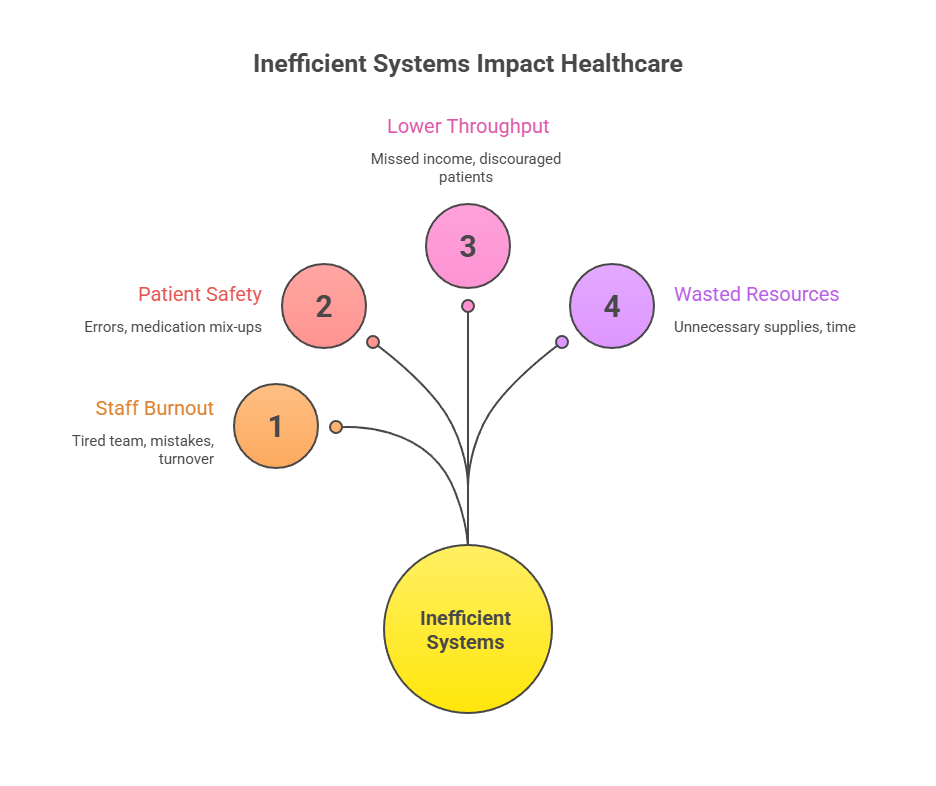
The cumulative effect of small, daily inefficiencies can be substantial. It’s like a leaky faucet; a few drips here and there don’t seem like much, but over time, they waste a significant amount of water. In a practice, these ‘drips’ are wasted minutes, duplicated efforts, and missed opportunities that drain your resources and hinder growth.
Consider the financial impact. A study by the American Medical Association found that administrative burdens, often a symptom of poor workflow, can cost physicians thousands of dollars annually in lost productivity. While this article focuses on the hidden costs, the visible ones are just as concerning. Ignoring optimization means you’re likely leaving money on the table and providing a less-than-ideal experience for everyone involved.
Improving how things run in a medical office isn’t just about making things faster; it’s about making them better for everyone involved. When you focus on healthcare workflow improvement, you’re looking at the whole picture, from how patients book appointments to how they get their test results. Let’s talk about some practical ways to make your medical practice workflow efficiency a reality.
First off, take a good look at your appointment scheduling. Are you using outdated methods? Maybe a simple online booking system could cut down on phone calls and no-shows. Think about how much time your front desk staff spends on the phone. Automating this can free them up for more important tasks, like helping patients directly when they’re in the office. This is a big part of clinical process optimization.
Next, consider patient check-in and check-out. Long waits at the front desk are a common complaint. Could implementing online forms or digital check-in kiosks make your patient intake process smoother? Streamlining clinical operations here means less frustration for patients and a smoother flow for your staff.
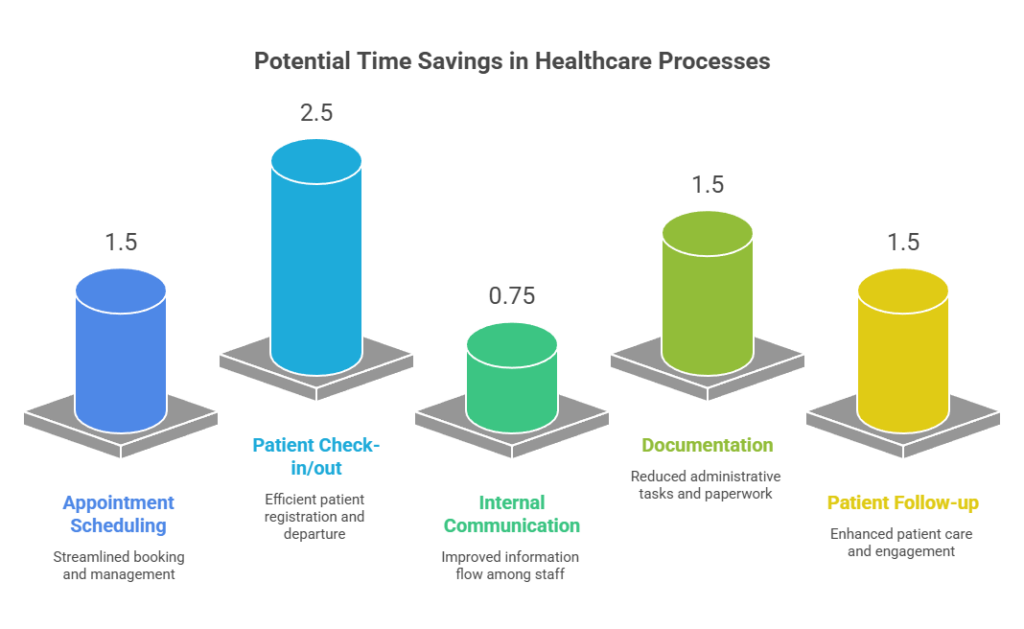
Third, let’s talk about communication. How do your doctors, nurses, and administrative staff talk to each other? Are messages getting lost or delayed? Implementing a secure messaging system within your electronic health record (EHR) or a dedicated communication app can make a huge difference. Clear and quick communication is key to good healthcare workflow management.
Fourth, review your documentation process. Physicians and nurses dedicate significant hours to charting daily. Are there ways to simplify this? Voice recognition software or standardized templates can cut down on typing. The goal isn’t to rush through notes, but to make the process less burdensome so more time can be spent with patients.
Finally, think about your follow-up procedures. How do you ensure patients get their test results, schedule follow-up appointments, or receive important health reminders? A systematic approach, perhaps using automated reminders or a dedicated patient outreach program, can improve adherence to care plans and patient satisfaction. This ties directly into better medical practice workflow efficiency.
| Process Area | Potential Time Saved Per Day (Estimate) |
| Appointment Scheduling | 1-2 hours |
| Patient Check-in/out | 2-3 hours |
| Internal Communication | 30-60 minutes |
| Documentation | 1-2 hours |
| Patient Follow-up | 1-2 hours |
Making these changes isn’t always easy, and it requires buy-in from the whole team. But the benefits – happier patients, less stressed staff, and a more profitable practice – are well worth the effort. Start small, pick one area, and build from there.
It’s pretty clear that technology is changing how medical practices run, and it’s making things smoother. Think about it: what used to take hours of paperwork can now be done with a few clicks. This isn’t just about making things faster; it’s about making them more accurate and less stressful for everyone involved.
Electronic Health Records (EHRs) are a big part of this. They keep patient information organized and accessible, cutting down on lost charts and duplicate tests. When doctors and nurses can quickly pull up a patient’s history, they can make better decisions on the spot. This also means fewer phone calls back and forth trying to get information.
The integration of these tools means less manual work and more time for what matters most: patient interaction. It’s not just about having the latest gadgets; it’s about using them smartly to improve the day-to-day operations of a practice.
Consider the impact on scheduling. Before, it was a constant battle with phone tag. Now, online scheduling systems let patients pick their own times, and the system automatically updates calendars. This reduces errors and makes sure the schedule is always current.
Moving to digital tools is essential, not optional, for practices striving to stay competitive and deliver top-quality care in today’s fast-paced world. Ignoring these advancements means falling behind.
We’re also seeing improvements in communication. Secure messaging platforms allow care teams to communicate quickly and efficiently about patient needs, without the delays of traditional methods. This kind of real-time collaboration can make a real difference in patient outcomes.
Ready to make your practice run smoother? Starting with clinical workflow optimization might seem like a big task, but breaking it down makes it manageable. It’s about making small, smart changes that add up to big improvements.
First things first, you need to know where you are right now. Take a good look at how things are done today. This means watching how patients move through your office, how staff handle tasks, and where delays happen. Mapping out your current processes is the absolute first step. You can’t fix what you don’t understand, right? This initial assessment helps pinpoint the bottlenecks and inefficiencies that are slowing you down. For a deeper dive into this initial phase, consider resources on medical office workflow.
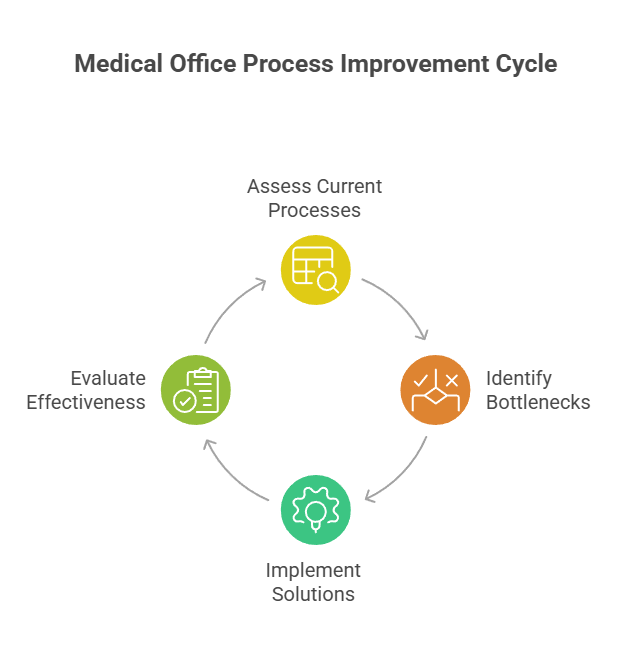
After identifying problem spots, set clear goals. What do you want to achieve? Maybe it’s reducing patient wait times by 15% or cutting down on administrative errors by 10%. Having measurable goals gives you something to aim for and helps track your progress.
Next, brainstorm solutions. This is your team’s moment to excel. Invite everyone to share their ideas, no matter how small—often the simplest ones make the biggest difference. Consider implementing new technologies, revising existing protocols, or providing additional staff training.
Implementing changes requires careful planning and execution. It’s not just about making a change; it’s about making the right change and seeing it through.
Remember, optimization isn’t a one-time fix. It’s a continuous cycle of assessment, improvement, and refinement. A structured approach lets you steadily enhance both efficiency and patient care in your practice.
Ready to make your clinic run smoother? Our guide, “Getting Started With Clinical Workflow Optimization: A Step-by-Step Action Plan,” breaks down how to improve your daily operations. Learn how to streamline tasks and boost efficiency. Visit our website today to get the full action plan and start making positive changes in your practice!
So, we’ve talked a lot about how to make your medical practice work more smoothly. It’s easy to get caught up in the day-to-day grind, feeling like you’re just trying to keep things afloat. But often, the real issue isn’t about having enough people; it’s about how the work gets done. Looking at your processes, from the moment a patient calls to when the bill is paid, can really make a difference.
When things flow well, your team feels less stressed, patients have a better time, and the business side of things looks healthier. It’s about making smart changes to how things are done so everything else falls into place. Don’t let your practice just survive; aim for it to run well.
Clinical workflow optimization is like making the daily tasks in your doctor’s office run much smoother and faster. Think about how patients check in, how doctors see patients, and how bills get paid. When these steps are organized well, everything works better. It’s important now because many practices feel overwhelmed, and improving how things are done can reduce stress for everyone, make patients happier, and help the practice make more money.
If a practice ignores improving its workflows, it can lead to big problems. Staff might get really stressed and tired because they’re constantly dealing with delays and confusion. Patients might have to wait too long or feel like they aren’t getting the best care. This can also cost the practice a lot of money because time is being wasted, and mistakes can happen more often. It’s like a car that isn’t maintained – it will eventually break down.
A great way to start is by looking at how you handle patient appointments. Maybe you can use a system that lets patients book appointments online, fill out forms before they arrive, or get reminders through text messages. This frees up your front desk staff to help with other important tasks and makes the check-in process quicker and easier for patients when they get to the office.
If you have any additional questions or if you would like to see how VP Medical Consultants could help your practice grow and implement Ai, please contact us at 813-806-0477.
 Optimized by Seraphinite Accelerator